
I Built a Document Comparison Agent (and You Can Too)
If you have ever reviewed two versions of a quote, contract, policy, or operating procedure, you know the pain. So, I built a Document Comparison Agent in Copilot Studio that helps with exactly that.

If you have ever reviewed two versions of a quote, contract, policy, or operating procedure, you know the pain. The change you care about is usually not the obvious part. It is the updated number in a table, a deleted sentence in the fine print, or a new requirement buried three pages down.
I wanted a repeatable way to answer one simple question with confidence:
What changed between these two documents?
So, I built a Document Comparison Agent in Copilot Studio that does exactly that. You give it two files. It runs a file comparison. It returns a clear, neutral summary of what was added, removed, and modified.
This post is a builder tutorial for customers and developers who want the same pattern.
What this agent does (and what it does not do)
What it does
Accepts two user provided documents
Uses only the File Comparison capability (via my “Gather files to compare” flow)
Produces an enterprise ready summary that is:
structured
factual
neutral
easy to review
What it does not do
No web browsing
No knowledge sources
No guessing intent
No legal or compliance interpretation
(It only reports observable differences.)
This keeps the output dependable and safe to use in review cycles.
The user experience
The conversation is simple on purpose:
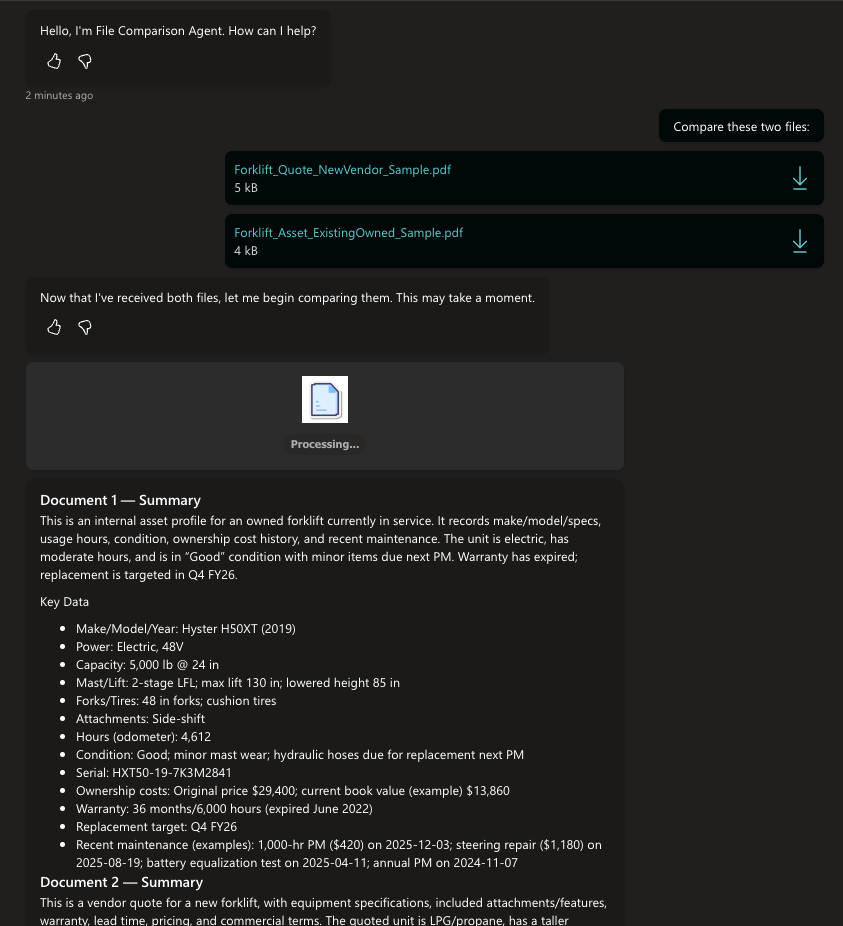
The agent confirms it received two files.
It shows a “Processing…” step so the user is not wondering if it stalled.
It returns:
Document 1 summary
Document 2 summary
Key data extracted from each (when present)
A structured comparison of changes
In my demo, I compared two forklift related PDFs (a vendor quote vs an existing asset profile). That is a great real-world example because the differences show up across specs, warranty, pricing, delivery, and included features.
How the components work
Here is the mental model of what you built.
1) File intake: two paths, one outcome
I designed the topic to handle the two common ways users arrive:
Path A: Files already attached
If the user already attached files in chat, the flow grabs them and assigns:
GlobalFileUpload1= first attachmentGlobalFileUpload2= second attachment
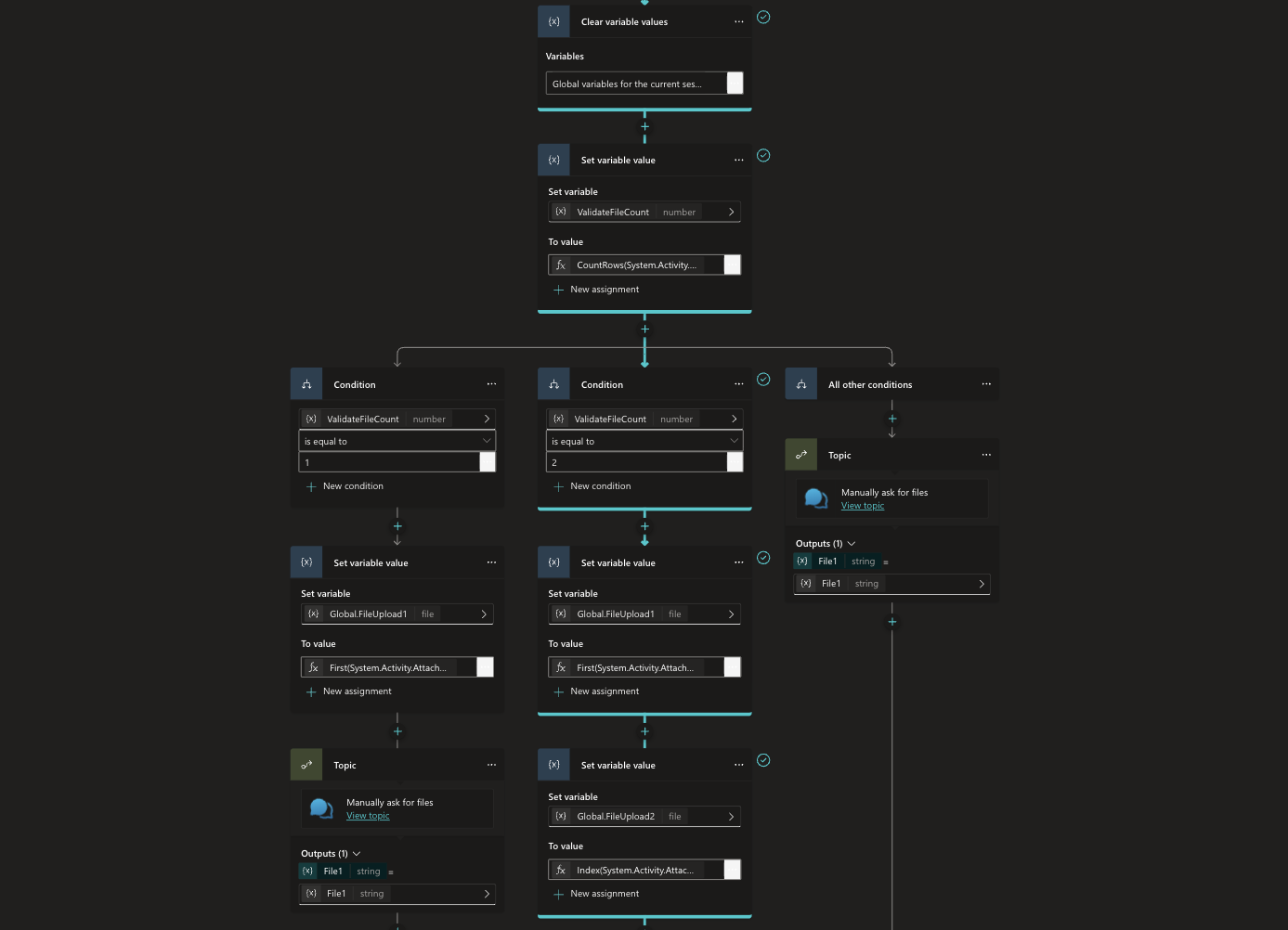
Path B: Prompted upload
If files are not present yet, the flow prompts:
“Upload the first file”
“Upload the second file”
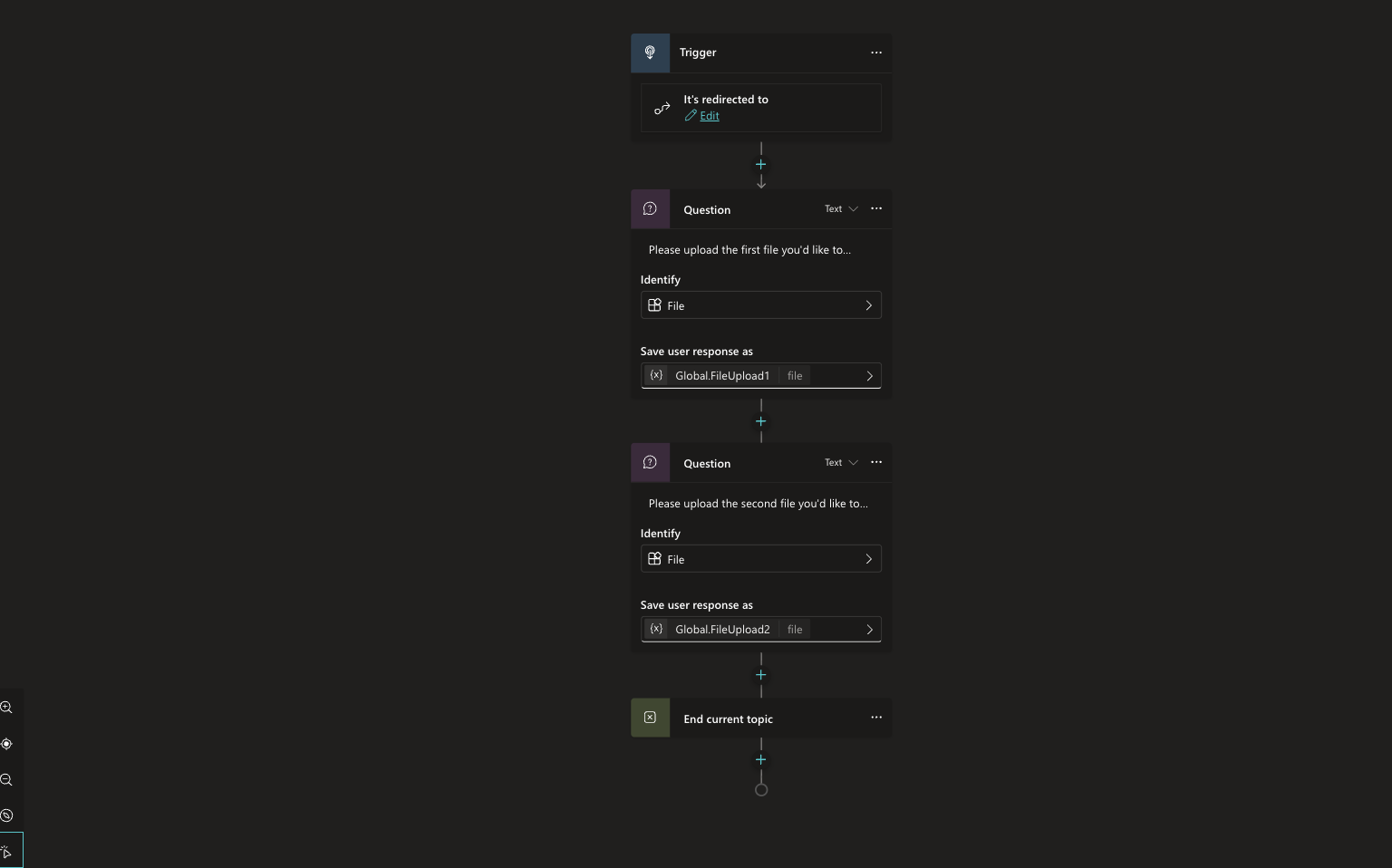
Both paths land in the same place: two populated file variables.
Why this matters: it makes the agent feel smart and forgiving. Users do not have to “start the right way.”
2) Validation gate: do not run comparison unless both files exist
Before calling File Comparison, I added a condition that checks:
GlobalFileUpload1is not blankGlobalFileUpload2is not blank
If either is missing, the agent routes the user back to file upload.
This prevents the most common failure mode: running a comparison with incomplete inputs and returning something misleading.
3) “Processing…” message: small detail, big trust
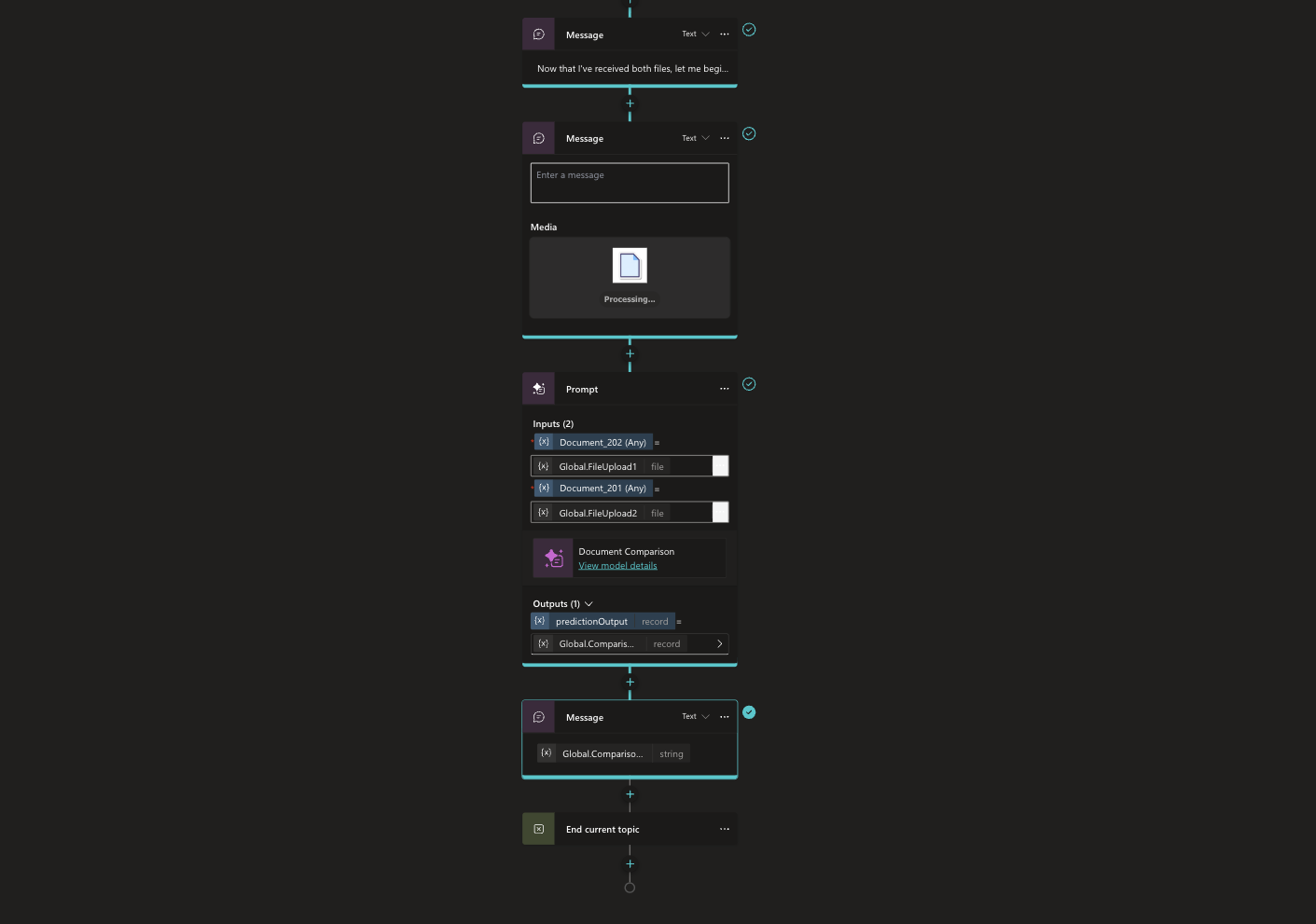
Right after validation, the agent posts a short message like:
“Now that I’ve received both files, I’m going to compare them. This may take a moment.”
Then it displays a simple processing adaptive card.
It sounds minor, but it improves adoption because people trust the agent more when it narrates what it is doing.
4) The comparison step: one tool, single source of truth
The core of the agent is a single call:
Input:
GlobalFileUpload1,GlobalFileUpload2Action: Document Comparison (File Comparison tool)
Output stored:
GlobalComparison
From here on, every sentence the agent produces is derived from that comparison output.
That is the guardrail. It is what keeps the agent neutral and accurate.
5) Response formatting: enterprise ready output
The final message step is where the comparison output is turned into something humans can act on.
Instead of dumping raw differences, I format the response into a review friendly structure:
Executive summary
Additions
Deletions
Modifications
Detailed breakdown (optional when the output is large)
That structure matches how people actually review documents.
Why this pattern works
This is not just a convenience feature. It solves real workflow problems:
Review cycles move faster because people start from a change map instead of page flipping.
Version control becomes practical for everyday documents, not just code.
Audits are easier because you can clearly show what changed between versions.
Teams align quicker because everyone is looking at the same summary structure.
And because the agent is tool only, it is easier to trust.
Known limitations (set expectations early)
A few things to keep in mind:
AI Prompts only support image or document inputs of PNG, JPG, JPEG, and PDF format.
PDFs without readable text may not compare well unless your environment includes text extraction.
Password protected or corrupted files may fail.
Sometimes there are truly no meaningful differences. Your agent should handle that gracefully and say so.
I built this agent because document comparison is one of those tasks that quietly drains time and attention across every organization. If you are already investing in agents, this is a high impact, low drama use case to start with.
If you try this pattern, I would love to hear: What kinds of documents are most painful for you to compare today?
If you want, I can also rewrite this into a shorter “developer quickstart” version, or turn it into a step by step checklist you can paste directly into your build notes.